🤖 Actix-web AI Agent
Actix-web AI Agent. Built with 🤎 in Rust
Effortless Backend Prototyping with Rust

RestOn
RestOn is an advanced tool that leverages the power of OpenAI’s GPT to automate the generation of backend code for your projects and prototypes.
It aims to streamline your development process, enabling the automatic creation of full-stack web applications and more complex systems.
Whether you need a simple CRUD app or a sophisticated SAAS platform, Auto GPT Agent has you covered.
Features
- 🌟 Automatic Code Generation: Use GPT API to generate backend code for services built with
actix-weband other popular Rust libraries. - 🔥 CRUD Operations: Generate standard operations for data manipulation (Create, Read, Update, Delete).
- 🛠️ Template Flexibility: Easily adapt web server templates to different requirements.
- 🌍 Ease of Use: Simple interface to interact with the project.
Tools











- Rust: The primary programming language for building fast, secure, and concurrent services.
- Actix-web: A powerful and fast web framework for building web applications on Rust.
- Tokio: An asynchronous framework for Rust used for parallel task handling and async calls.
- Reqwest: An HTTP client for interacting with external APIs.
- GPT API: Used for generating code and executing tasks based on text-based queries.
Installation
1. Clone the Repository
git clone https://github.com/chemyl/auto_gpt_agent.git
cd auto_gpt_agent
2. Install Rust (if not already installed)
To install Rust, use the following command:
curl --proto '=https' --tlsv1.2 -sSf https://sh.rustup.rs | sh3. Install Dependencies
Run the following command to install project dependencies:
cargo build4.Add OPEN_AI Keys
    OPEN_AI_ORG
    OPEN_AI_KEY
.env
5. Run the Project
Start the project with:
cargo runUsage
1. Generate Backend Code
Simply send a text query to the system, and it will generate backend code for you.
Example query:
Create a webserver that shows today viral news in the US3. Confirmation
After generating the backend code, you can
Example Usage
1. Console Output
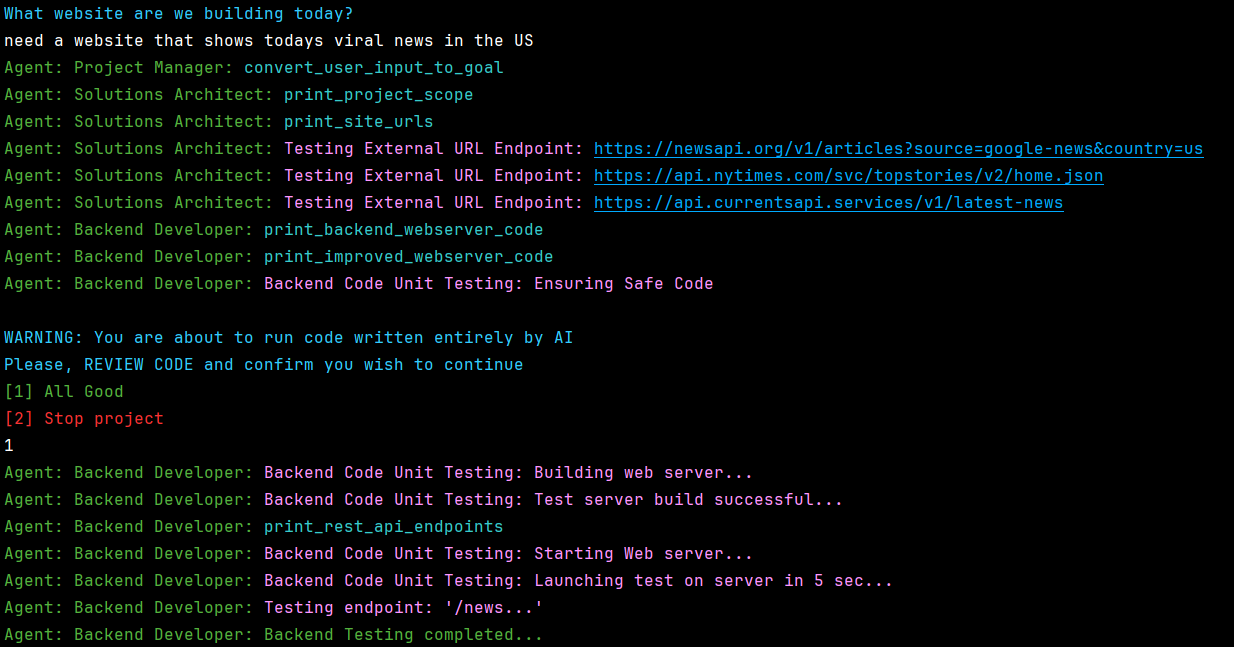
2. Generated [main] Example
#[actix_web::main]
async fn main() -> std::io::Result<()> {
    let db: Database = Database::load_from_file().unwrap_or_else(|_| Database::new());
    let data: web::Data<AppState> = web::Data::new(AppState {
        db: Mutex::new(db)
    });

    HttpServer::new(move || {
        App::new()
            .wrap(
                Cors::permissive()
                    .allowed_origin_fn(|origin, _req_head| {
                        origin.as_bytes().starts_with(b"http://localhost") || origin == "null"
                    })
                    .allowed_methods(vec!["GET", "POST", "PUT", "DELETE"])
                    .allowed_headers(vec![header::AUTHORIZATION, header::ACCEPT])
                    .allowed_header(header::CONTENT_TYPE)
                    .supports_credentials()
                    .max_age(3600)
            )
            .app_data(data.clone())
            .route("/news", web::post().to(create_news))
            .route("/news", web::get().to(read_all_news))
            .route("/news", web::put().to(update_news))
            .route("/news/{id}", web::get().to(read_news))
            .route("/news/{id}", web::delete().to(delete_news))
    })
        .bind("127.0.0.1:8080")?
        .run()
        .await
}
How It Works
- The project uses GPT API to process text queries and generate code.
- Queries are sent to the system, which then generates backend code based on the input.
- The code generation includes:
- Creating new HTTP server.
- Route creation for handling requests.
- Json Database setup.
- The generated code can be directly run on your server or further customized to fit your needs.
Future Plans
- Support for More Complex Templates: Allow generation of more specialized services based on detailed templates.
- Command-Line Interface (CLI): A more advanced CLI for managing the project.
- Support for Additional Databases: Integration with more databases like MongoDB, MySQL, SQLite, and others.
- CI/CD Integration: Automate deployment pipelines.
- Project requirements: Perform in-depth client onboarding.
- Extend testing: Test all dynamic routes.
- Frontend development: Develop frontend Automation Agent based on Yew.
- Local LLM: Introduced local open source LLMs.
Contributing
Welcome contributions! If you have ideas to improve the project, please create an issue or submit a pull request.
How to Contribute
- Fork the repository.
- Create your feature branch (
git checkout -b feature-branch). - Commit your changes (
git commit -am 'Add new feature'). - Push to your branch (
git push origin feature-branch). - Open a Pull Request.
License
This project is licensed under the MIT License - see the LICENSE file for details.